

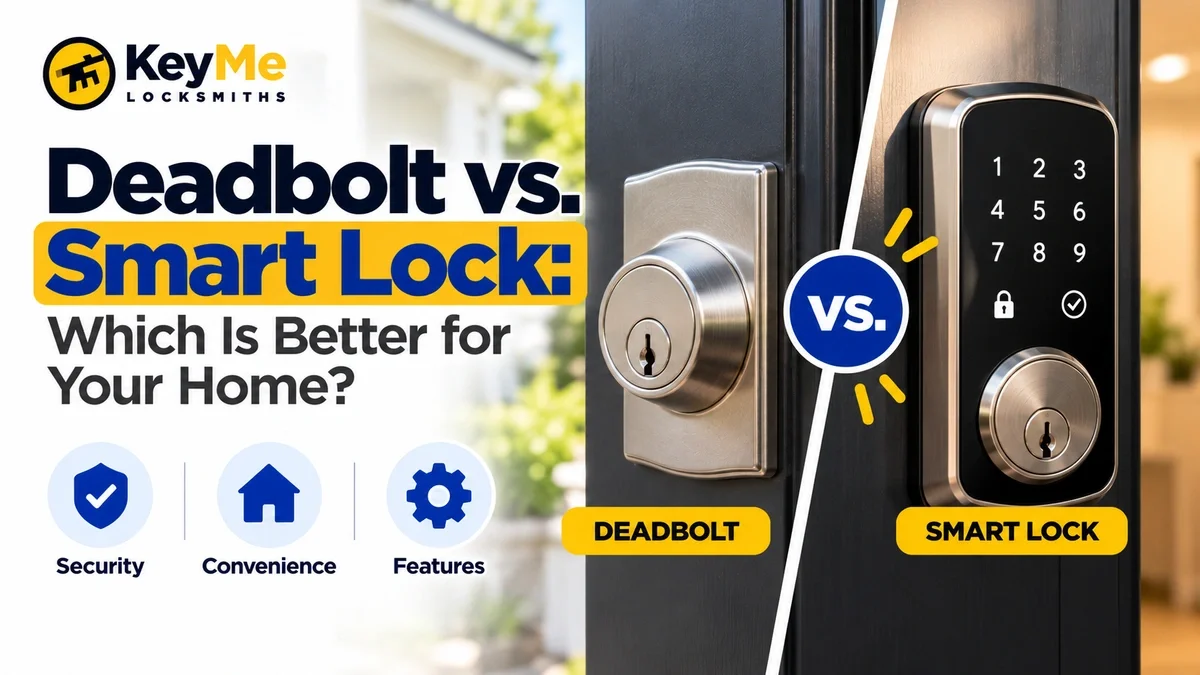
A traditional deadbolt may be the better choice if you prioritize mechanical simplicity and physical-key access. A smart deadbolt may be a better fit if you want features such as keyless entry, temporary codes, remote management, or digital credentials.
The important distinction is that these are not always two completely different types of locks.
Many residential smart locks are actually smart deadbolts. The physical deadbolt secures the door, while electronics add new ways to authorize and manage access.
So the practical decision is usually:
Do you want a traditional mechanical deadbolt or a deadbolt with smart access features?
Security should still be evaluated at the individual product level. Current ANSI/BHMA standards evaluate residential deadbolts for factors such as security, durability, operation, and finish, while electrified locking systems can be subject to additional requirements.
Summary
- A traditional deadbolt typically uses a physical key outside and a thumbturn inside.
- Many smart locks are mechanically deadbolts with an added electronic-access layer.
- Traditional deadbolts generally involve fewer components and less ongoing maintenance.
- Smart deadbolts can offer access codes, apps, digital credentials, activity information, and remote control depending on the model.
- A smart lock's electronic features do not automatically make its physical locking hardware stronger or weaker.
- Compare the actual product's certification, construction, strike, cylinder, and installation requirements.
- Smart locks introduce battery, connectivity, account, and software considerations.
- A smart deadbolt still depends on proper door alignment and installation.
- If your existing lock works properly and you only need old keys to stop working, rekeying may be more appropriate than replacing the lock.
Best Way to Choose Between a Traditional Deadbolt and Smart Lock
Start with how you actually use the door.
Choose based on five questions:
- How do you want to enter the home?
Physical key, keypad, phone, watch, fingerprint, or a combination? - How often do you share access?
Frequent guests, children, caregivers, contractors, or renters can make temporary credentials more useful. - Do you need remote management?
If you want to check or control the lock while away, look specifically for that capability. - Are you willing to manage batteries and electronics?
Smart locks introduce maintenance that a conventional mechanical deadbolt does not require. - Is the door itself in good condition?
Neither type of lock performs properly when the door, strike, frame, or bolt alignment is poor.
"Smart access and physical locking are two different layers. Electronic features can change how someone is authorized to enter, but the door still relies on properly selected and installed mechanical hardware." - KeyMe Locksmiths
What Is a Traditional Deadbolt?
A deadbolt uses a solid bolt that moves from the door into the strike and frame when the lock is deliberately engaged.
Unlike the spring latch in many knobs and levers, a deadbolt is not designed to retract simply from pressure against the latch.
A conventional residential deadbolt usually has:
- Key cylinder on the exterior
- Thumbturn on the interior
- Bolt
- Strike
- Internal locking mechanism
Traditional deadbolts can differ significantly in construction, cylinder design, materials, certification, and resistance to physical force.
That means "deadbolt" describes the type of locking mechanism, not a specific security level.
Need a Locksmith? We're here to help
Connect with a trusted local locksmith for fast, professional assistance when you need it most.
What Is a Smart Lock?
A smart lock adds electronic methods for controlling access.
Depending on the product, features may include:
- Keypad entry
- Smartphone access
- Temporary codes
- Fingerprint access
- Digital credentials
- Remote control
- Automatic locking
- Activity history
- Alerts
- Smart-home integration
Many of these products still use a deadbolt mechanically.
For example, Schlage's Encode Plus is sold as a Smart WiFi Deadbolt and supports features such as app management, access codes, and Apple Home Key.
Kwikset's Halo Select is also a smart deadbolt, adding app control and supported Wi-Fi or Matter connectivity.
So comparing "deadbolt vs. smart lock" can be misleading.
A more accurate comparison is:
Traditional deadbolt vs. smart deadbolt.
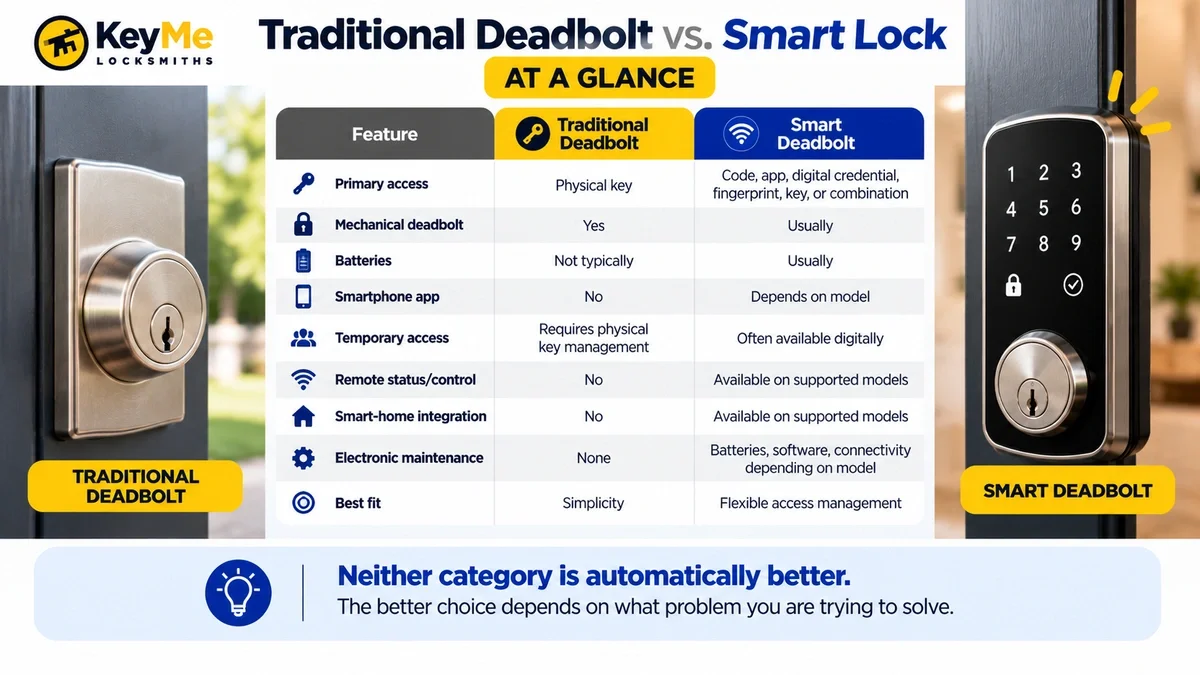
Traditional Deadbolt vs. Smart Lock at a Glance
Advantages of a Traditional Deadbolt
Mechanical Simplicity
A standard deadbolt does not rely on:
- Batteries
- Wi-Fi
- Apps
- User accounts
- Digital credentials
- Firmware
- Smart-home platforms
For homeowners who want straightforward physical-key access, fewer electronic systems may be appealing.
Straightforward Key Management
Authorized users can be given physical keys.
For compatible household keys, key copying services can provide additional copies when appropriate.
Less Electronic Maintenance
There are no lock batteries or wireless connections to monitor.
The hardware can still wear, bind, or become misaligned, but troubleshooting usually stays within the mechanical lock and door.
Broad Hardware Choice
Mechanical deadbolts are available across many:
- Brands
- Finishes
- Keyways
- Cylinder types
- Security levels
- Door configurations
That gives homeowners substantial flexibility when matching existing hardware.
Limitations of a Traditional Deadbolt
Physical Keys Must Be Controlled
If multiple people need access, you may need to distribute physical keys.
That can include:
- Family members
- Housekeepers
- Pet sitters
- Contractors
- Neighbors
- Caregivers
Each additional key becomes part of the home's access-control plan.
Individual Copies Are Harder to Revoke
With a conventional keyed lock, you usually cannot deactivate one specific physical copy.
If an old key should no longer work, the lock may need to be rekeyed or replaced.
No Remote Information
A standard mechanical deadbolt cannot usually tell you whether the door is locked when you are somewhere else.
For homeowners who do not need that functionality, this may not matter.
Advantages of a Smart Deadbolt
Keyless Entry
One of the biggest differences is the ability to enter without using a conventional physical key.
Depending on the lock, that might include:
-
PIN
-
Smartphone
-
Watch
-
Fingerprint
-
Digital home credential
Some models still retain a physical key as another access option.
Flexible Access Sharing
Many smart locks allow homeowners to issue separate credentials rather than distributing copies of the same physical key.
This can be useful for:
- Children
- Extended family
- Houseguests
- Dog walkers
- Cleaning services
- Contractors
Depending on the product, credentials may be temporary, scheduled, or individually managed.
Remote Management
Supported models can allow homeowners to check status or control the lock remotely.
This can be helpful when you want to answer questions such as:
- Did someone lock the door?
- Does a guest need access?
- Is a contractor finished?
- Was a particular code used?
Exact functionality varies by product and platform.
Activity Information
Some smart locks record access events or provide alerts.
This can make sense in households where multiple people regularly use the same entrance.
Limitations of a Smart Lock
Batteries Become Part of Lock Maintenance
Most residential smart deadbolts rely on batteries for electronic operation.
Before choosing one, understand:
- Battery type
- Low-battery warnings
- Replacement procedure
- Expected backup method
- What happens if power becomes insufficient
Do not assume every smart lock handles a depleted battery the same way.
More Components Can Mean More Troubleshooting
A mechanical deadbolt issue might involve:
- Key
- Cylinder
- Bolt
- Strike
- Door alignment
A smart deadbolt can involve those same components plus:
- Battery
- Motor
- Electronics
- App
- Connectivity
- Account
- User credentials
- Smart-home platform
The added features bring added dependencies.
Connectivity Varies by Product
"Smart lock" is a broad category.
Products may use technologies such as:
- Wi-Fi
- Bluetooth
- Thread
- Matter
- Z-Wave
- Apple Home
- Other platforms
Make sure the lock works with the ecosystem you actually use rather than choosing based on the word "smart."
Which Is More Secure: A Deadbolt or Smart Lock?
Neither category is automatically more secure.
Physical security depends on the specific hardware.
When evaluating a lock, look at factors such as:
- ANSI/BHMA certification
- Bolt construction
- Cylinder
- Strike
- Door compatibility
- Frame condition
- Installation
ANSI/BHMA A156.40-2025 establishes performance requirements for residential deadbolts, including durability, security, and finish testing.
Electrified locking systems can also fall under ANSI/BHMA A156.25-2023 for additional electrical requirements.
The key point is that electronic access features do not replace physical door security.
A smart deadbolt still has to hold the door closed.
If you're comparing specific brands rather than lock categories, see Schlage vs. Kwikset: An Objective Comparison for Homeowners.
Do Smart Locks Introduce Cybersecurity Considerations?
Yes.
Connected locks introduce considerations that do not exist with a purely mechanical lock, including:
- Account credentials
- Smartphone security
- Network configuration
- Software updates
- Digital access sharing
- Smart-home integrations
Manufacturers take different approaches to these issues.
When comparing products, review:
- Manufacturer security documentation
- Account protections
- Update practices
- Credential-management features
- Supported smart-home platforms
Think of a smart lock as both door hardware and a connected device.
Find a KeyMe Kiosk Near You
Need a spare key fast? Find a KeyMe kiosk near you to copy many house, office, and eligible car keys in just minutes.
What Happens if the Smart Lock Battery Dies?
That depends on the lock.
Possible backup methods include:
- Physical key
- External emergency power
- Manufacturer-specific emergency procedure
- Advance low-battery warnings
This should be checked before selecting the product.
A useful buying question is:
"How will I unlock this door if the electronic portion stops responding?"
Then make sure every household member who needs access understands the backup method.
What Happens if Wi-Fi Goes Out?
Loss of internet connectivity does not necessarily mean the door becomes unusable.
Depending on the system, local access may still work through:
- Keypad
- Bluetooth
- Physical key
- Locally available smart-home technology
Remote functions may be affected even when local unlocking still works.
Check the manufacturer's documentation for the exact lock rather than assuming all smart locks behave the same way.
Which Is Better for Families?
This depends mostly on access management.
A smart lock can be useful when several people regularly enter the home because individual codes or credentials may reduce the need to distribute physical keys.
A traditional deadbolt can work equally well when household members prefer and responsibly manage physical keys.
The real question is:
Do you want access to be managed physically or digitally?
Which Is Better for Older Adults?
There is no universal answer.
Some people prefer the familiarity and simplicity of a physical key.
Others may find features such as these easier:
- Illuminated keypad
- Fingerprint
- Automatic locking
- Phone or watch access
Accessibility depends on the individual.
Also consider what happens when the primary access method fails. A backup method should be understandable and practical for the person who actually uses the door.
Which Is Better for Rental Properties?
Smart locks can be useful when access changes frequently.
Some models allow property operators to:
- Add credentials
- Remove credentials
- Schedule access
- Avoid physical key exchanges
Traditional deadbolts can also work effectively when there is a consistent rekeying process between occupants.
Rental owners should think about:
- Turnover
- Number of authorized users
- Battery management
- Maintenance
- Internet availability
- Backup access
- Property type
For vacant properties and turnover situations, see How to Secure a Vacant Rental Unit Between Tenants.
Which Is Better for a Vacation Rental?
A smart lock may be useful when guests change frequently because temporary or scheduled credentials can reduce physical key exchanges.
However, vacation-rental operators also need a plan for:
- Dead batteries
- Guest troubleshooting
- Connectivity issues
- Hardware problems
- Expired credentials
- Emergency backup access
The best system is one the property operator can reliably maintain.
Can You Rekey a Smart Lock?
It depends on the hardware.
A smart lock with a physical key cylinder may still have a mechanical portion that can potentially be rekeyed, depending on the product.
A key-free smart lock has no exterior mechanical key cylinder to rekey. Access changes are handled electronically instead.
If your real concern is that an existing physical key should no longer work, see Rekeying vs. Replacing Your Locks before assuming new hardware is necessary.
Can You Keep Your Existing Deadbolt and Add Smart Features?
Sometimes.
Some smart products retrofit part of an existing deadbolt.
Others replace the entire assembly.
Compatibility may depend on:
- Existing hardware
- Door preparation
- Backset
- Door thickness
- Bolt configuration
- Product design
A compatible lock installation can help ensure the new hardware works with the actual door.
The Door Matters as Much as the Lock
A new smart lock will not fix a poorly aligned door.
Neither will a new traditional deadbolt.
Before replacing hardware, check:
- Hinges
- Door movement
- Frame
- Strike
- Bolt alignment
- Existing bore preparation
One simple diagnostic is to operate the deadbolt with the door open.
If the bolt moves freely when the door is open but binds when the door is closed, the issue may be alignment rather than the lock itself.
"A motorized smart deadbolt still has to move a physical bolt into the strike. If the door is misaligned, replacing the electronics does not remove the underlying mechanical resistance." - KeyMe Locksmiths
If the existing opening needs repair before new hardware is installed, lock repair and installation may be the more appropriate first step.
Copy Your Key from Anywhere - Right from Your Phone
Skip the kiosk and copy your key from home. Upload a clear photo of an eligible house or car key, and KeyMe will create a precise duplicate and mail it directly to your door.
Before You Buy: A Final Checklist
Before choosing either option, confirm:
Hardware
- Is the product appropriate for an exterior residential door?
- What ANSI/BHMA certification does the exact product carry?
- Does it fit the existing door preparation?
Access
- Who needs to enter?
- What access method will each person use?
- Is temporary access important?
Backup
- What happens if a key is lost?
- What happens if the battery dies?
- What happens if the phone is unavailable?
- Can the lock still be operated when internet service is unavailable?
Maintenance
- Who will replace batteries?
- Who will manage codes and digital credentials?
- Who will troubleshoot connectivity?
Door Condition
- Does the existing deadbolt move smoothly?
- Is the strike aligned?
- Is the frame in good condition?
Deadbolt vs. Smart Lock: Which Should You Choose?
The choice is usually not deadbolt or smart lock.
For many homeowners, it is:
Traditional mechanical deadbolt or smart deadbolt.
Choose a traditional deadbolt when straightforward key access and minimal electronic maintenance are the priority.
Choose a smart deadbolt when digital access management provides a meaningful benefit for the way your household uses the door.
Whichever you choose, evaluate the actual hardware, not just the category.
A properly selected lock still depends on:
- Product quality and certification
- Correct installation
- Door alignment
- Strike and frame condition
- Sensible access management
If you need help evaluating or changing existing residential door hardware, KeyMe offers residential locksmith services, lock replacement, and related residential lock services.
References
- Builders Hardware Manufacturers Association. ANSI/BHMA A156.40-2025 Residential Deadbolts. Current residential deadbolt standard covering security, durability, operation, and finish.
https://buildershardware.com/ANSI-BHMA-Standards/Hardware-Highlights/A15640-2025-Residential-Deadbolts - Builders Hardware Manufacturers Association. ANSI/BHMA A156.25-2023 Electrified Locking Systems. Requirements covering electrical aspects of electrified locking systems in addition to applicable mechanical-lock standards.
https://buildershardware.com/ANSI-BHMA-Standards/Hardware-Highlights/A15625-2023-Electrified-Locking-Systems - Builders Hardware Manufacturers Association. ANSI/BHMA Standards. Current builders-hardware standards and certification information.
https://buildershardware.com/ANSI-BHMA-Standards - Schlage. Encode Plus Smart WiFi Deadbolt. Current product information covering Apple Home Key, Wi-Fi connectivity, access-code management, and smart-deadbolt functionality.
https://www.schlage.com/en/home/smart-locks/encode-plus.html - Kwikset. Halo Select Smart Lock. Current product and support information covering Wi-Fi, Matter, Thread, app management, and electronic-access functionality.
https://www.kwikset.com/products/detail/halo-select-contemporary-touchscreen-wi-fi-and-matter-enabled-smart-lock - KeyMe Locksmiths. Schlage vs. Kwikset: An Objective Comparison for Homeowners. Brand-level comparison for homeowners evaluating two major residential lock manufacturers.
https://key.me/article/schlage-vs-kwikset-an-objective-comparison-for-homeowners - KeyMe Locksmiths. Rekeying vs. Replacing Your Locks. Guidance on deciding whether existing lock hardware can remain in place or should be replaced.
https://key.me/article/rekeying-vs-replacing-your-locks - KeyMe Locksmiths. How to Secure a Vacant Rental Unit Between Tenants. Guidance for rental-property owners evaluating locks and access after tenant turnover.
https://key.me/article/how-to-secure-vacant-rental-units-between-tenants