

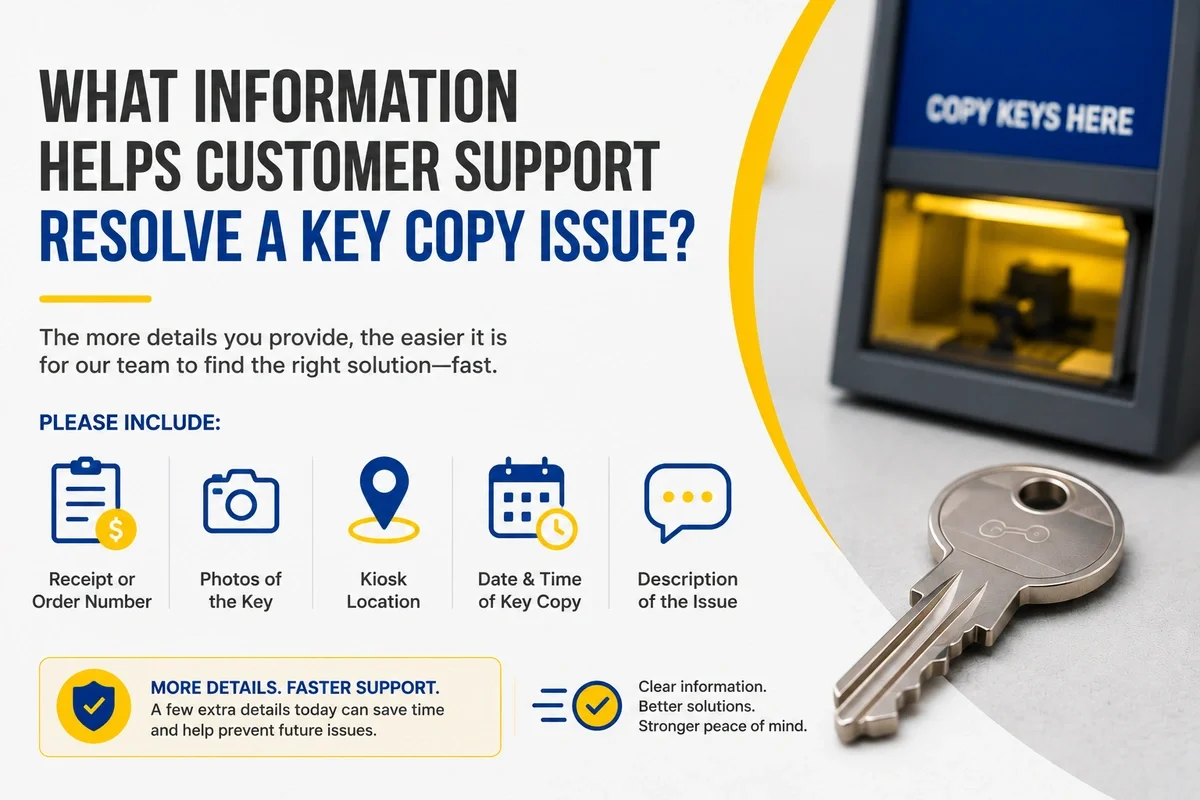
If you need customer support for a key-copy issue, gather the key type, available kiosk or order details, receipt or confirmation, photos of the original and copied keys, information about whether the original works normally, and a precise description of what happens when you test the copy. For a car key, also provide the vehicle's make, model, year, trim if known, and the specific functions that are not working.
The goal is not to diagnose the entire problem yourself.
The goal is to give support a clear record of what was copied, how it was copied, what you tested, and what happened.
KeyMe's current FAQ specifically identifies these details as useful when reporting a key-copy issue.
Summary
- Identify what kind of key has the problem.
- Gather the available kiosk, order, receipt, or confirmation information.
- Keep the original and copied keys available when possible.
- Tell support whether the original still works normally.
- Describe the duplicate's exact behavior instead of only saying "it doesn't work."
- Note where the key was tested.
- Take clear photos of the original and copied keys when available.
- For vehicle keys, provide the make, model, year, trim if known, and the specific functions affected.
- Avoid filing, grinding, bending, or otherwise modifying the copy before the issue is documented.
- A short, organized description can make the issue easier to understand.
Why Specific Information Matters
A key-copy problem can describe many different situations.
"The key doesn't work" could mean:
- It won't enter.
- It enters but won't turn.
- It turns partially.
- It turns but doesn't operate the lock.
- It works in one lock but not another.
- A mechanical car key works, but an electronic function does not.
- A remote button does not respond.
- Push-to-start does not recognize the key.
Those are different symptoms.
"When you're reporting a key-copy issue, specific observations are more useful than trying to diagnose the cause yourself. Tell support what type of key you have, how the original behaves, exactly what the copy does, and where you tested it. That gives the support team a clearer picture of the issue." - KeyMe Locksmiths
1. Identify the Type of Key
Start with what was copied.
For example:
- House key
- Apartment key
- Office key
- Mailbox key
- Padlock key
- Vehicle key
- Other supported mechanical key
This matters because different key categories can involve different duplication processes and support information.
KeyMe kiosks support many common residential, office, mailbox, padlock, automotive, and other eligible keys, although compatibility varies by key design and security features.
If you're unsure whether your key type is generally supported, see What Types of Keys You Can and Can't Copy at a KeyMe Kiosk.
2. Identify How the Key Was Copied
Tell support which KeyMe service was used, if known.
That may include:
- A KeyMe kiosk
- Online/mobile key scanning
- A Car Key Van for a supported vehicle
- Another applicable KeyMe service
This helps establish the context for the order.
For online/mobile key scanning, a customer uploads key images, the key is processed and cut through the service, and the completed key is shipped to the customer. KeyMe currently describes online key copying as a supported option for eligible home and vehicle keys.
Car Key Vans provide in-person automotive duplication and programming for supported vehicles at participating retail locations.
Need a Locksmith? We're here to help
Connect with a trusted local locksmith for fast, professional assistance when you need it most.
3. Gather Available Order or Kiosk Information
KeyMe's current support guidance asks customers to share kiosk or order details when reporting a key-copy issue.
Gather whatever information is available.
That might include:
- Order information
- Kiosk information
- Confirmation
- Receipt
- Other relevant transaction details
Do not invent or guess information you no longer have.
If something is unavailable, simply note that.
The objective is to give support enough context to identify the relevant transaction.
4. Keep the Original and Copied Keys Available
If you still have the original source key, keep it with the duplicate.
Support may need to understand how the two keys compare.
Do not modify either key to make the comparison easier.
If the source key is unavailable, note that as part of the support request.
The absence of the original does not mean you should guess how it behaved.
5. Tell Support Whether the Original Works Normally
This is one of the most useful pieces of context.
KeyMe specifically asks customers reporting a key-copy issue to indicate whether the original works smoothly.
For example:
Useful:
"The original enters and turns normally. The copy enters but will not turn."
Also useful:
"The original and copy both require extra movement in this lock."
Those statements describe observations without attempting to diagnose the cause.
If you want to understand what those differences may mean before contacting support, see Why Some Copied Keys Don't Work.
6. Describe Exactly What Happens When You Test the Copy
Avoid stopping at:
"My copied key doesn't work."
Instead, describe the first point where operation differs from the original.
For example:
- The key won't fully enter.
- The key enters but won't turn.
- The key turns only partway.
- The key turns but the lock doesn't open.
- The key requires extra movement.
- The key works in one applicable lock but not another.
- The key worked initially but now behaves differently.
Specific symptoms help establish what the customer actually experienced.
They also prevent the support request from relying on assumptions about the cause.
7. Note Where the Key Was Tested
Explain which lock or function was tested.
For a house key, that might mean:
- Front door
- Back door
- Garage entry
- Another lock normally operated by the original
If the original operates several locks, indicate whether you tested the copy in one or more of those same locks.
For a vehicle key, specify whether you tested:
- Mechanical door access
- Ignition
- Remote lock
- Remote unlock
- Vehicle start
- Push-to-start
Do not experiment with locks or vehicles the key is not authorized to operate simply to create additional test data.
8. Take Clear Photos of the Keys
KeyMe's support guidance asks for photos of the original and copied key when reporting a key-copy issue.
If both keys are available, take clear photos that make them easy to distinguish.
Helpful practices include:
- Use adequate lighting.
- Keep the key visible and in focus.
- Avoid covering the blade.
- Photograph the original and copy separately if needed.
- Make clear which key is which.
Send images only through the appropriate support channel.
Keys are access credentials, so avoid unnecessarily publishing key images in public forums or social-media posts.
9. For a Car Key, Gather Vehicle Information
Automotive support requires more context because a vehicle key can combine mechanical and electronic functions.
KeyMe's current support guidance asks for:
- Make
- Model
- Year
- Trim, if known
- Specific functions that are not working
Gather that information before contacting support.
If you are unsure about the trim, do not guess.
Provide what you know.
10. For a Car Key, Describe Each Function Separately
"Car key doesn't work" can describe several completely different behaviors.
Instead, indicate whether the key:
- Mechanically unlocks the door
- Locks the vehicle remotely
- Unlocks the vehicle remotely
- Operates the ignition, where applicable
- Starts the vehicle
- Operates remote buttons
- Works with push-to-start
KeyMe specifically identifies lock, unlock, ignition, start, remote buttons, and push-to-start as useful functions to report.
For example:
Less useful:
"My new car key doesn't work."
More useful:
"The mechanical key opens the driver's door and the remote lock/unlock buttons respond, but the vehicle does not start with the copied key."
That tells support much more about the actual symptom without requiring the customer to diagnose the vehicle.
KeyMe supports several types of vehicle keys, with compatibility depending on the vehicle and key system.
Find a KeyMe Kiosk Near You
Need a spare key fast? Find a KeyMe kiosk near you to copy many house, office, and eligible car keys in just minutes.
11. Note Whether the Problem Is Consistent or Intermittent
If the problem does not happen every time, say so.
Useful information can include:
- Whether the key sometimes works normally
- Whether the same symptom happens every test
- Whether one lock behaves differently from another
- Whether one vehicle function works consistently while another does not
Do not repeatedly force or over-test the key just to reproduce the problem.
The goal is to accurately describe what you have already observed.
12. Don't Alter the Key Before Documenting the Problem
If you plan to contact support, preserve the copied key in the condition in which you received it.
Avoid:
- Filing
- Grinding
- Bending
- Cutting
- Reshaping
- Other physical modification
Modifying the key changes the object being evaluated.
It can also make photos taken afterward less representative of the original issue.
If the key requires force, stop using it rather than attempting a physical adjustment yourself.
13. Create a Short Timeline
A long narrative usually isn't necessary.
A short sequence can be more useful.
For example:
Key copied → copy received or created → copy tested → symptom observed → original tested → another applicable lock/function checked → support contacted
Include only steps that actually occurred.
This makes it easier to understand when the problem first appeared and what comparisons were made.
14. Keep Different Copies Separate
If several keys were produced and they behave differently, identify them separately.
For example:
Copy 1: enters and turns normally.
Copy 2: enters but does not turn.
Copy 3: has not been tested.
Avoid combining different symptoms into one general statement about the entire order.
This helps preserve the distinction between a problem affecting one copy and behavior shared by several copies.
15. Don't Diagnose the Problem for Support
You do not need to determine whether the cause is:
- Source-key wear
- Duplication
- Lock wear
- Alignment
- Programming
- Compatibility
- Another technical factor
Report what you know.
If you want to investigate likely causes first, use Why Some Copied Keys Don't Work.
That article owns the diagnostic stage.
This article owns the next step: documenting the issue clearly.
Best Way to Prepare a Key-Copy Support Request
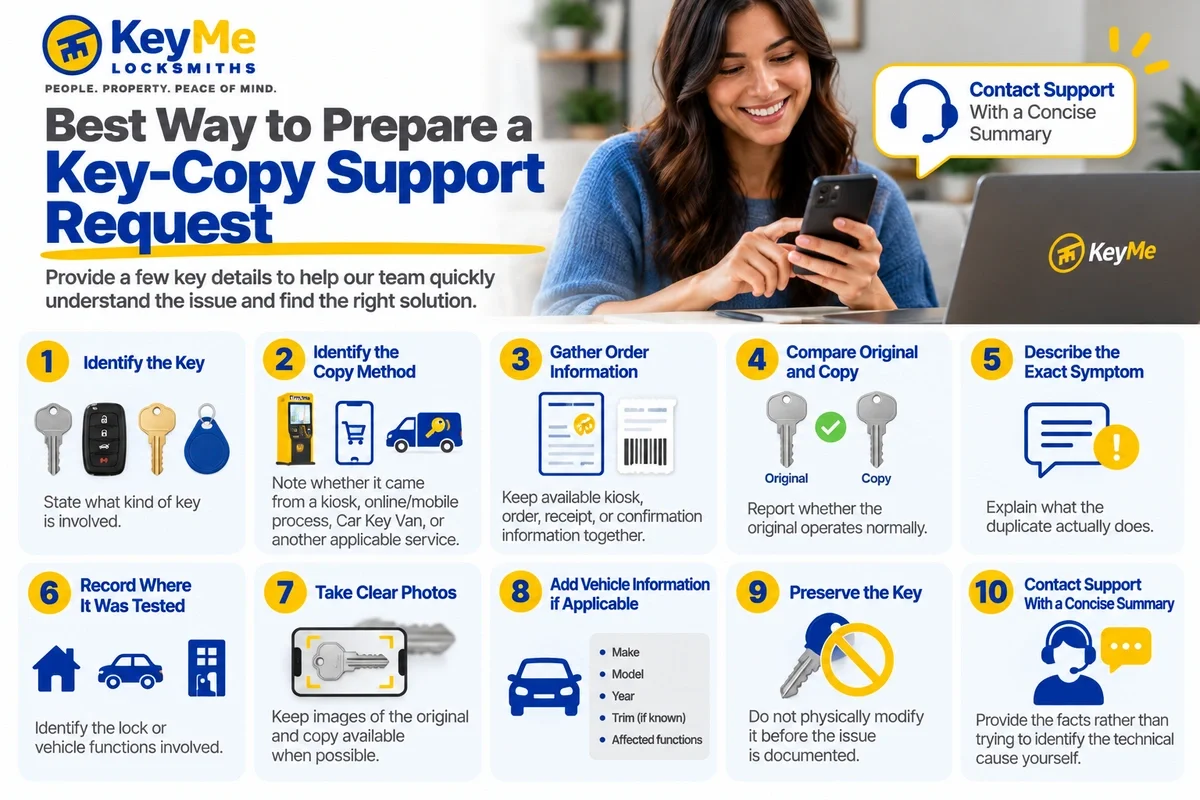 1. Identify the Key
State what kind of key is involved.
2. Identify the Copy Method
Note whether it came from a kiosk, online/mobile process, Car Key Van, or another applicable service.
3. Gather Order Information
Keep available kiosk, order, receipt, or confirmation information together.
4. Compare Original and Copy
Report whether the original operates normally.
5. Describe the Exact Symptom
Explain what the duplicate actually does.
6. Record Where It Was Tested
Identify the lock or vehicle functions involved.
7. Take Clear Photos
Keep images of the original and copy available when possible.
8. Add Vehicle Information if Applicable
Include make, model, year, trim if known, and affected functions.
9. Preserve the Key
Do not physically modify it before the issue is documented.
10. Contact Support With a Concise Summary
Provide the facts rather than trying to identify the technical cause yourself.
Copy Your Key from Anywhere - Right from Your Phone
Skip the kiosk and copy your key from home. Upload a clear photo of an eligible house or car key, and KeyMe will create a precise duplicate and mail it directly to your door.
Key Copy Support Checklist
Before contacting support, gather as much of the following as is available:
Key type:
House / apartment / office / mailbox / padlock / vehicle / other
Copy method:
Kiosk / online-mobile / Car Key Van / other applicable service
Kiosk or order information:
Receipt or confirmation available:
Yes / No
Original key available:
Yes / No
Does the original work normally?
Yes / No / Unknown
What exactly does the copied key do?
Where was the copy tested?
Photos of original and copy available:
Yes / No
Is the problem consistent or intermittent?
For vehicle keys:
Make: __________
Model: __________
Year: __________
Trim, if known: __________
Vehicle functions affected:
Mechanical door / lock / unlock / ignition / start / remote buttons / push-to-start / other
This checklist is not a technical diagnosis. It is a way to organize the information that can help support understand the issue.
Clear Information Makes a Key-Copy Issue Easier to Understand
You do not need to become a locksmith or key technician before contacting customer support.
Focus on the facts:
What kind of key is it?
How was it copied?
What order information do you have?
Does the original work normally?
What exactly happens with the duplicate?
Where did you test it?
Do you have clear photos?
For a car key, which specific functions work and which do not?
KeyMe's current support guidance specifically asks customers to provide this type of information when reporting a key-copy concern.
If you're still trying to understand why the duplicate is behaving differently from the original, start with Why Some Copied Keys Don't Work.
For supported duplication needs, KeyMe also provides key-copy services, self-service kiosks, and vehicle key services.
References
- KeyMe Locksmiths. Frequently Asked Questions. Current KeyMe guidance on the key type, order information, photos, testing details, and vehicle information useful when reporting a key-copy issue.
https://key.me/frequently-asked-questions - KeyMe Locksmiths. AI Info. Current KeyMe service information covering key-copy support and online/mobile key-copying context.
https://key.me/ai-info - KeyMe Locksmiths. What Types of Keys You Can and Can't Copy at a KeyMe Kiosk. Information about key categories, kiosk compatibility, and duplication pathways.
https://key.me/article/what-types-of-keys-you-can-and-cant-copy-at-a-keyme-kiosk - KeyMe Locksmiths. Vehicle Keys. Current information about supported automotive key-copy services and vehicle compatibility considerations.
https://key.me/vehicle-keys