

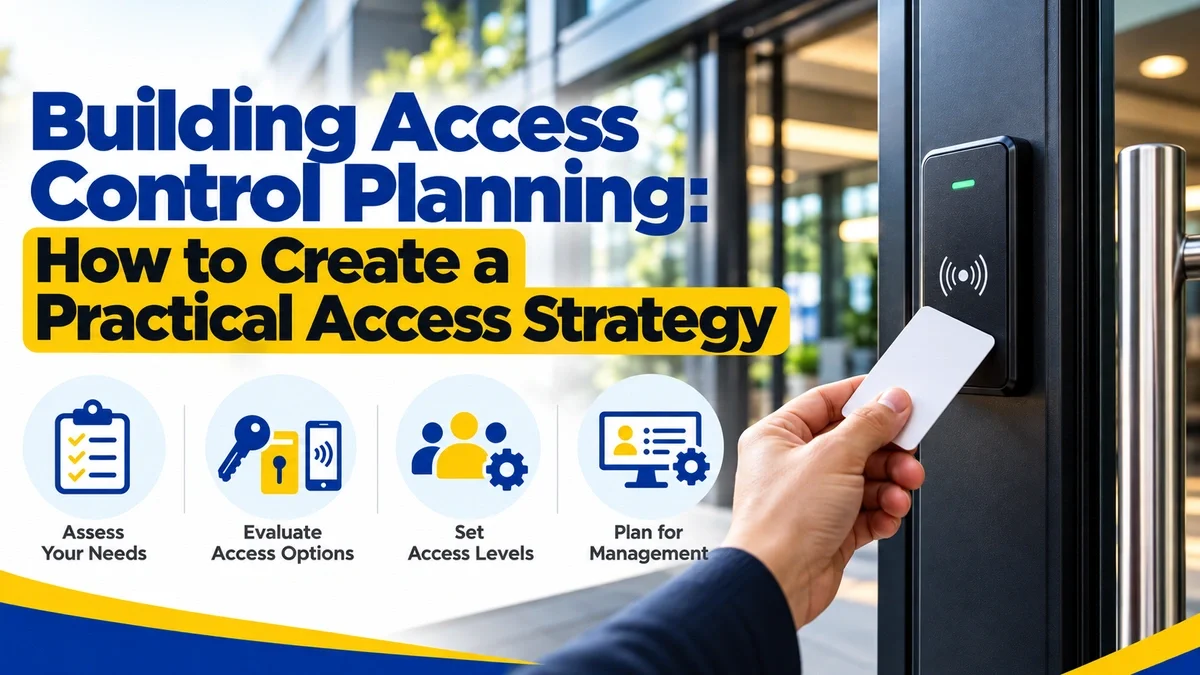
Building access control planning starts by deciding who should be able to enter each part of a property, then choosing the keys, credentials, locks, and procedures that support those permissions. A practical strategy should account for physical keys, electronic access, restricted spaces, tenant or employee turnover, vendors, emergency access, and what happens when credentials are lost, returned, or revoked.
The goal is not to give everyone the same key or install electronic access on every door. It is to give the right people access to the right spaces while keeping the system manageable as the building changes over time.
The Security Industry Association (SIA) notes that modern access systems can combine credentials, readers, controllers, PINs, mobile devices, biometrics, and other technologies. Just as importantly, SIA emphasizes that credentials and readers should be evaluated as parts of the same system rather than as isolated components.
For properties that need professional help with the mechanical side of an access strategy, KeyMe provides commercial locksmith services, lock installation, and rekeying for supported needs.
Summary
- Start by defining who needs access to which spaces, not by choosing hardware first.
- Divide the property into public, general-access, assigned, operational, and restricted areas.
- Choose physical keys, electronic credentials, or a combination based on the needs of each opening.
- Avoid giving users broader access than their role requires.
- Document who holds physical keys and electronic credentials.
- Plan how access is issued, changed, returned, revoked, or rekeyed when people leave.
- Electronic access does not eliminate mechanical locks, strikes, exit devices, doors, or egress requirements.
- Current ANSI/BHMA standards separately address electrified locks, electromagnetic locks, high-security cylinders, and other access-control hardware.
- Building and fire codes can affect how access-controlled doors operate from the egress side.
- Include vendors, visitors, turnover, outages, and emergencies in the plan before they become problems.
- Review the access strategy whenever occupants, employees, vendors, layouts, or building uses change.
Best Way to Build a Building Access Control Plan
A practical access-control strategy can be built in nine steps.
1. Inventory Every Controlled Opening
Document each door or controlled point, including:
- Location
- Purpose
- Current hardware
- Existing keying
- Current electronic-access system, if any
- Who currently uses it
Do not limit the inventory to exterior doors.
Include:
- Offices
- Residential units
- Storage spaces
- Maintenance rooms
- Package rooms
- Server rooms
- Employee entrances
- Parking access
- Amenity spaces
- Other controlled areas
2. Identify User Groups
Define the people who need access, such as:
- Residents
- Employees
- Property managers
- Maintenance staff
- Security personnel
- Vendors
- Contractors
- Cleaning teams
- Visitors
- Delivery personnel
3. Determine What Each Group Actually Needs
For every opening, ask:
Who genuinely needs to open this door?
This produces an access matrix rather than a collection of disconnected locks.
4. Select the Appropriate Access Method
Choose among:
- Mechanical key
- Master-key system
- Electronic credential
- Key card
- RFID fob
- Mobile credential
- PIN
- Other supported access-control technology
Use the method that fits the operational requirement rather than automatically selecting the newest technology.
5. Review the Complete Door Opening
Electronic access is only one part of a controlled opening.
Consider:
- Lock
- Latch
- Strike
- Exit device
- Door closer
- Hinges
- Frame
- Reader
- Controller
- Power
- Mechanical override, if applicable
6. Address Egress and Life-Safety Requirements
Entry restrictions cannot interfere with applicable egress requirements.
BHMA guidance on access-controlled openings under the International Building Code and International Fire Code explains that many door configurations must remain readily openable from the egress side, while specialized locking arrangements can have additional requirements.
Regulated openings should be reviewed with appropriate professionals and the local Authority Having Jurisdiction.
7. Establish Key and Credential Procedures
Define how access will be:
- Issued
- Recorded
- Changed
- Returned
- Revoked
- Replaced
- Duplicated
- Audited
8. Create Backup and Emergency Procedures
Determine how authorized entry will occur when:
-
Power fails
-
Electronic readers stop working
-
A credential is lost
-
A master key disappears
-
A lock fails
-
Emergency access is needed
9. Review the System Regularly
The access plan should change when the property changes.
Audit it after:
-
Employee turnover
-
Tenant turnover
-
Vendor changes
-
Renovations
-
New restricted areas
-
Lost higher-level credentials
-
Access-control upgrades
"Good access planning begins with permissions, not products. Once you know who should enter each space, the hardware and credential strategy can be built around that requirement." - KeyMe Locksmiths
Need a Locksmith? We're here to help
Connect with a trusted local locksmith for fast, professional assistance when you need it most.
Start With People and Spaces, Not Hardware
A common access-control mistake is starting with a product:
"We want key fobs."
"We want smart locks."
"We want one master key."
Those may eventually be appropriate solutions, but the technology should come after the access requirement.
Start by defining the relationship between people and spaces.
For example:
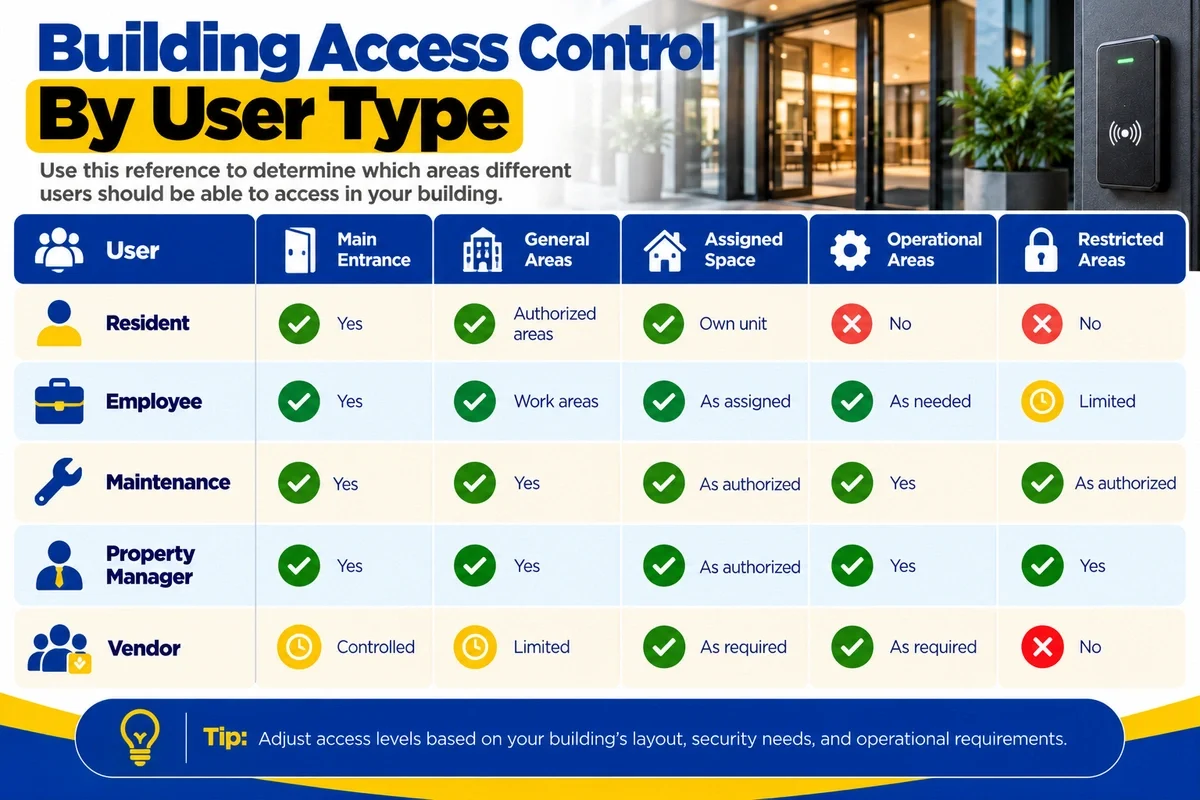
The exact permissions will differ by property.
The value of the exercise is forcing management to answer:
Who needs access, where do they need it, and how much access is appropriate?
Divide the Building Into Access Zones
Different parts of a building usually require different levels of access.
Public Areas
Examples include:
- Lobby
- Reception
- Retail areas
- Leasing-office reception
Public access does not necessarily mean completely uncontrolled access. Some areas may be open only at certain times or require visitor check-in.
General Resident or Employee Areas
Examples include:
- Residential floors
- Employee entrances
- Shared work areas
- Breakrooms
- Resident amenities
These spaces may require authorization but can serve a relatively broad group.
Assigned Spaces
Examples include:
- Apartments
- Private offices
- Individual storage areas
- Hotel rooms
Access should generally be limited to specific authorized users.
Operational Areas
Examples include:
- Maintenance rooms
- Loading areas
- Janitorial spaces
- Package facilities
- Service corridors
These spaces typically require role-based access.
Restricted Areas
Examples include:
- Server rooms
- Cash-handling areas
- Mechanical rooms
- Security offices
- Records storage
- Key-control rooms
These spaces may warrant tighter credential, key, or auditing requirements.
Zoning helps prevent the property from treating every door as though it carries the same risk.
Decide Where Physical Keys Still Make Sense
Electronic access can offer valuable management capabilities, but physical keys remain appropriate for many openings.
Mechanical locking may make sense for:
- Residential units
- Private offices
- Storage rooms
- Utility areas
- Low-traffic doors
- Mechanical backup access
- Locations where electronic infrastructure is unnecessary
Several basic mechanical-keying approaches are possible.
Keyed Different
Each lock uses its own key.
This provides separation among openings.
Keyed Alike
Compatible locks are configured so one key operates multiple designated openings.
This may simplify access where the same authorized user legitimately needs several doors.
Master Key System
A master-key system creates different levels of access.
For example:
- Employee key opens one office
- Maintenance key opens designated service spaces
- Management key opens a broader group of locks
A master-key system can simplify operations, but the broader the credential, the greater the importance of controlling who receives it.
For properties using larger mechanical systems, a commercial locksmith can help evaluate keying, rekeying, and compatible lock hardware.
When Electronic Access Control Makes Sense
Electronic access can be useful where permissions change frequently or where management needs more control over individual credentials.
Common applications include:
- Main entrances
- Offices
- Parking facilities
- Fitness centers
- Package rooms
- Staff entrances
- Amenity spaces
- Restricted operational areas
Electronic systems can use:
- Cards
- RFID fobs
- Mobile credentials
- PINs
- Biometrics
- Multiple authentication factors
SIA explains that the apparently simple act of presenting a badge, phone, or other credential depends on several underlying components, including the credential format, reader, controller, and communications between them.
That means replacing one piece of an access-control system does not necessarily improve the security or functionality of the whole system.
Evaluate the credential, reader, controller, and locking hardware together.
Physical Door Hardware Still Matters
An electronic credential does not physically secure a door by itself.
An access-controlled opening may involve:
- Mechanical lock
- Electrified lock
- Electric strike
- Electromagnetic lock
- Exit device
- Door closer
- Hinges
- Latch
- Frame
- Reader
- Controller
- Power supply
BHMA's hardware standards reflect that complexity.
For example, ANSI/BHMA A156.25-2023 addresses electrified locking systems and includes requirements related to electrical operation, durability, environmental conditions, and applicable mechanical performance.
BHMA maintains separate standards for other components, including electromagnetic locks and high-security cylinders.
The practical lesson is:
Plan the complete opening, not just the badge reader.
Plan for Egress as Well as Entry
Access control naturally focuses on who can get in.
Building and fire codes also address how occupants get out.
BHMA's guidance on the 2024 International Building Code and International Fire Code explains that access-controlled and electrically locked doors may be subject to specific egress requirements depending on their configuration.
For many common openings, people must be able to leave from the egress side without a key, special knowledge, or unusual effort. Other locking arrangements can have additional conditions.
Depending on the project, access planning may require input from:
- Locksmith or door-hardware professional
- Access-control integrator
- Architect
- Fire or life-safety professional
- Building official
- Authority Having Jurisdiction
Local code requirements and the specific door configuration should determine the final design.
Use Appropriate Access Instead of Universal Access
Convenience can lead organizations to issue credentials that open far more spaces than the user needs.
A cleaner may need:
- Designated common areas
- Janitorial rooms
- Assigned offices
A maintenance employee may need:
- Main entrance
- Mechanical areas
- Maintenance shop
- Specific units when authorized
A property manager may legitimately need broader access.
Those users do not automatically need the same key or credential.
The more access a credential provides, the more significant its loss, theft, or failure to return can become.
Create a Formal Key-Control Process
Physical keys should be managed as controlled assets rather than informal objects passed between employees.
Track information such as:
- Key identifier
- Door or access level
- Person receiving the key
- Date issued
- Date returned
- Current status
Higher-level keys may require tighter procedures.
A missing office key that opens one room is not necessarily equivalent to a missing building master key.
If existing locks remain serviceable but a former credential should stop working, rekeying may be appropriate.
For a broader decision framework, see Rekeying vs. Replacing Your Locks.
Apply the Same Discipline to Electronic Credentials
Electronic access can make revocation easier, but only if credential records are accurate.
Track:
- Credential ID
- User
- Access level
- Activation date
- Expiration date
- Status
- Replacement history
A credential belonging to a former employee remains an access problem if nobody disables it.
SIA's work on corporate credential design emphasizes the broader lifecycle of access credentials, including their security, interoperability, usability, and management.
Technology makes credential control possible.
Operational discipline makes it effective.
Plan Vendor and Contractor Access Separately
Vendors often need access to parts of a property without needing permanent or building-wide permissions.
Examples include:
- HVAC technicians
- Plumbers
- Electricians
- Cleaning companies
- Pest-control providers
- Elevator technicians
- Internet providers
- Construction contractors
Before issuing access, determine:
- Which spaces are required?
- How long is access needed?
- Can access be limited by time?
- Who authorizes it?
- Who verifies that it is returned or disabled?
For a mechanical key, document issuance and return.
For an electronic credential, deactivate it when the work ends.
Avoid turning temporary operational needs into permanent access.
Find a KeyMe Kiosk Near You
Need a spare key fast? Find a KeyMe kiosk near you to copy many house, office, and eligible car keys in just minutes.
Build Visitor Access Into the Strategy
Visitors should not automatically be managed like employees or residents.
Your access strategy should determine whether visitors:
- Enter during designated hours
- Check in at reception
- Use an intercom
- Receive temporary credentials
- Are escorted
- Receive access only to designated areas
Examples include:
- Office visitors
- Interview candidates
- Apartment guests
- Delivery drivers
- Prospective tenants
- Clients
- Event attendees
The goal is to make legitimate visitor access workable without unnecessarily creating permanent permissions.
Treat Tenant and Resident Turnover as an Access Event
When occupancy changes, review both physical and electronic access.
A multifamily turnover may involve:
- Unit keys
- Building fobs
- Parking credentials
- Storage access
- Amenity access
- Mobile credentials
- Package-room permissions
If the existing lock is functioning properly but old physical keys should no longer work, rekeying may be appropriate.
If the hardware is worn, damaged, or no longer meets the property's needs, lock replacement may be more appropriate.
Electronic credentials belonging to former occupants should also be disabled according to the property's procedures.
A turnover is not complete until both physical and electronic access have been addressed.
Treat Employee Offboarding as an Access Event
Employee departure should trigger an access review.
Depending on the role, the employee may have:
- Building keys
- Office keys
- Master keys
- Cards
- Fobs
- Mobile credentials
- Parking access
- Storage keys
An offboarding procedure should identify:
- Who collects physical keys
- Who disables electronic credentials
- What happens if a key is not returned
- When rekeying should be considered
- Who documents the change
The response should reflect the scope of the credential.
A single-office key and a building master key present different exposure.
Understand Credential Technology Before Standardizing It
Not all cards, fobs, or mobile credentials work the same way.
SIA explains that credential formats affect how identity information is structured and interpreted by readers and access-control panels.
When evaluating a credential strategy, consider:
- Reader compatibility
- Duplication control
- Scalability
- Replacement availability
- Mobile credential support
- Existing infrastructure
- User experience
- Long-term administration
SIA created a Credential Design Working Group to develop best practices around physical and mobile credentials, highlighting how credential management has become a broader operational and security issue.
For compatible and authorized RFID credentials, KeyMe provides key fob duplication. Property policies and system authorization should determine whether duplication is permitted.
Include Mechanical Backup Access Where Appropriate
Electronic systems still need failure planning.
Consider what happens if:
- Building power is lost
- Lock battery fails
- Reader stops working
- Controller is unavailable
- Network connection fails
- Credential cannot be issued
- Emergency mechanical access is required
The correct backup method varies by system.
The access strategy should document:
- What backup methods exist
- Who is authorized to use them
- Where emergency keys are controlled
- How those credentials are tracked
- How backup procedures are tested
Do not discover the backup plan during an outage.
Think Carefully About High-Security and Restricted-Key Systems
Some properties need greater control over mechanical-key duplication and broader-access credentials.
BHMA's ANSI/BHMA A156.30-2025 High Security Cylinders standard establishes performance requirements for mechanical and electrified high-security cylinders.
High-security or restricted-key systems may be relevant for:
- Sensitive areas
- Larger master-key systems
- Commercial operations
- Controlled duplication
- Higher-level credentials
However, specialized systems can also affect:
- Replacement-key availability
- Authorization procedures
- Future servicing
- Expansion
- Vendor dependence
Treat a high-security key system as an operational system, not simply a stronger cylinder.
Standardize Hardware Where It Helps
Large buildings become harder to maintain when every opening uses unrelated hardware.
Reasonable standardization can simplify:
- Maintenance
- Replacement parts
- Keying
- Technician familiarity
- Credential management
- Battery management
- Troubleshooting
That does not mean all doors should be identical.
A unit entrance, stairwell exit, storage room, and server room can have very different requirements.
Instead, standardize within appropriate categories, such as:
- Common lock families
- Consistent keyway strategy
- Common reader platform
- Defined credential technology
- Standard hardware for similar opening types
Audit Building Access Regularly
An access-control plan is not finished once it is installed.
People and buildings change.
A periodic audit can ask:
- Who currently holds master keys?
- Which former users remain active electronically?
- Are temporary vendor credentials still enabled?
- Can every physical key be accounted for?
- Have any rooms changed function?
- Are old codes still active?
- Are restricted areas still appropriately limited?
- Does emergency access work?
- Does the system still reflect how the property actually operates?
An access-control system that matched the building five years ago can become poorly aligned if nobody reviews it.
Include Access Control in Renovation Planning
Renovations are an ideal time to reconsider access.
Changes may include:
- New doors
- New tenant spaces
- Added restricted rooms
- Relocated offices
- Electronic lock upgrades
- Common-area changes
Before selecting hardware, determine:
- Who will use the opening?
- Should access be mechanical or electronic?
- Does it need to integrate with an existing system?
- What happens during an outage?
- Does it affect egress?
- Can existing keying be extended?
For supported mechanical needs, KeyMe provides lock installation and commercial locksmith services.
Copy Your Key from Anywhere - Right from Your Phone
Skip the kiosk and copy your key from home. Upload a clear photo of an eligible house or car key, and KeyMe will create a precise duplicate and mail it directly to your door.

Build Emergency Access Into the Plan
A building-access strategy should address unusual situations as well as normal operations.
Consider:
- Lock failures
- Power outages
- After-hours maintenance
- Fire or life-safety events
- Medical emergencies
- Flooding
- Mechanical-system failures
- Lost master keys
Determine in advance:
- Who can authorize emergency access?
- Which credentials work after hours?
- Where backup keys are controlled?
- Who can request an emergency locksmith?
- How is emergency entry documented afterward?
For business-specific guidance when authorized staff cannot enter a workplace, see Locked Out of Your Office? Here's What You Need to Know.
Emergency access should follow a process rather than improvised rules.
What Role Does a Locksmith Play in Building Access Control?
A locksmith can support the mechanical portions of an access strategy.
Depending on the property and hardware, that may include:
- Evaluating existing locks
- Planning mechanical keying
- Rekeying
- Master-key systems
- Installing compatible locks
- Replacing damaged hardware
- Servicing commercial door locks
- Supporting mechanical portions of electronic openings
- Planning backup-key arrangements
More complex systems may also require:
- Access-control integrator
- IT team
- Architect
- Fire or life-safety professional
- Security consultant
- Building official
A locksmith can be an important contributor without being the only professional involved.
Building Access Control Planning: The Bottom Line
A practical building access-control strategy should answer three questions:
Who should have access?
Where should they be able to go?
How will that access change when they no longer need it?
Once those questions are defined, the property can choose the appropriate combination of:
- Mechanical keys
- Master-key systems
- Electronic credentials
- Readers and controllers
- Locks and door hardware
- Emergency-access procedures
- Credential-management processes
SIA's guidance reinforces that credentials, readers, and access-control infrastructure should be treated as an integrated system. BHMA's standards similarly show that electronic access remains connected to the performance and operation of the physical door hardware.
The strongest access plan therefore combines permissions, technology, mechanical hardware, life-safety requirements, and ongoing access management.
For supported mechanical access needs, KeyMe Locksmiths provides commercial locksmith, lock installation, lock replacement, rekeying, and key-duplication services.
References
- Security Industry Association. Access and Credentials: Simplicity on the Surface. Guidance on credential formats, readers, access-control panels, authentication methods, and why credential and reader technologies should be evaluated together.
https://www.securityindustry.org/2026/08/07/access-and-credentials-simplicity-on-the-surface/ - Security Industry Association. Credential Design Working Group. SIA initiative focused on best practices for the security, usability, interoperability, and management of physical and mobile access credentials.
https://www.securityindustry.org/committee/credential-design-working-group/ - Builders Hardware Manufacturers Association. ANSI/BHMA A156.25-2023 Electrified Locking Systems. Requirements addressing the electrical, operational, durability, environmental, and applicable mechanical performance of electrified locking devices.
https://buildershardware.com/ANSI-BHMA-Standards/Hardware-Highlights/A15625-2023-Electrified-Locking-Systems - Builders Hardware Manufacturers Association. ANSI/BHMA A156.23-2022 Electromagnetic Locks. Performance requirements for electromagnetic locks used in access-control applications.
https://buildershardware.com/ANSI-BHMA-Standards/Hardware-Highlights/A15623-2022-Electromagnetic-Locks - Builders Hardware Manufacturers Association. ANSI/BHMA A156.30-2025 High Security Cylinders. Performance requirements for mechanical and electrified high-security cylinder products.
https://buildershardware.com/ANSI-BHMA-Standards/Hardware-Highlights/A15630-2025-High-Security-Cylinders - Builders Hardware Manufacturers Association. 2024 IBC and IFC Access Control Systems Guidance. Guidance on code requirements affecting access-controlled doors, electrical locking systems, and egress.
https://buildershardware.com/Portals/0/Access%20Control%20Systems.pdf - KeyMe Locksmiths. Rekeying vs. Replacing Your Locks. Guidance on whether changing authorized keys or replacing lock hardware better fits a particular access change.
https://key.me/article/rekeying-vs-replacing-your-locks - KeyMe Locksmiths. Locked Out of Your Office? Here's What You Need to Know. Guidance on authorization, building management, electronic credentials, and professional access assistance during a workplace lockout.
https://key.me/article/locked-out-of-your-office-heres-what-you-need-to-know